
 Michele Eccher
On this page
What data do you need before changing the catalog?
Export your categories, products, and variants from the CMS, including URLs, stock keeping units (SKUs), availability, and prices. Add the pages generated by filters, sorting, and pagination. These often won't appear in a product export, but you can find them by browsing the store or running a crawler. Save a dated copy of the inventory before making changes.
Choose a product family that matters to the store and includes different situations. Our fictional store carries eight lamp models: four desk lamps, two bedside lamps, and two floor lamps. One is temporarily out of stock, and some come in several colors. The store also keeps a page for a ninth, discontinued model. All URLs, product details, and financial figures in this example are illustrative; they do not describe a client.
For the first review, include every page in this family, along with its URL variations. For a larger catalog, sample each page template and stock status that actually exists. If you find a template error, check how many other pages use that template. Fixing only the sampled product could leave the same problem elsewhere.
Combine the inventory with Search Console data by page and query, organic landing sessions from Analytics, and orders from your order management system. The last three complete months are a reasonable starting point. If the assortment is seasonal, compare that period with the same months a year earlier. Without access to private data, you can review structure and content, but mark indexing, observed demand, and sales as "needs verification." Missing data doesn't mean a page has no value.
Which page should answer each search?
Search for the terms your customers use in the market you sell to. Notice whether the results show product lists, a specific model, or explanations. In Search Console, select a query and open the Pages tab to see which URLs receive impressions. If two URLs appear for the same query, compare their content. Their presence alone doesn't prove that one hurts the other.
| Search or use | Proposed URL | Decision and reason |
|---|---|---|
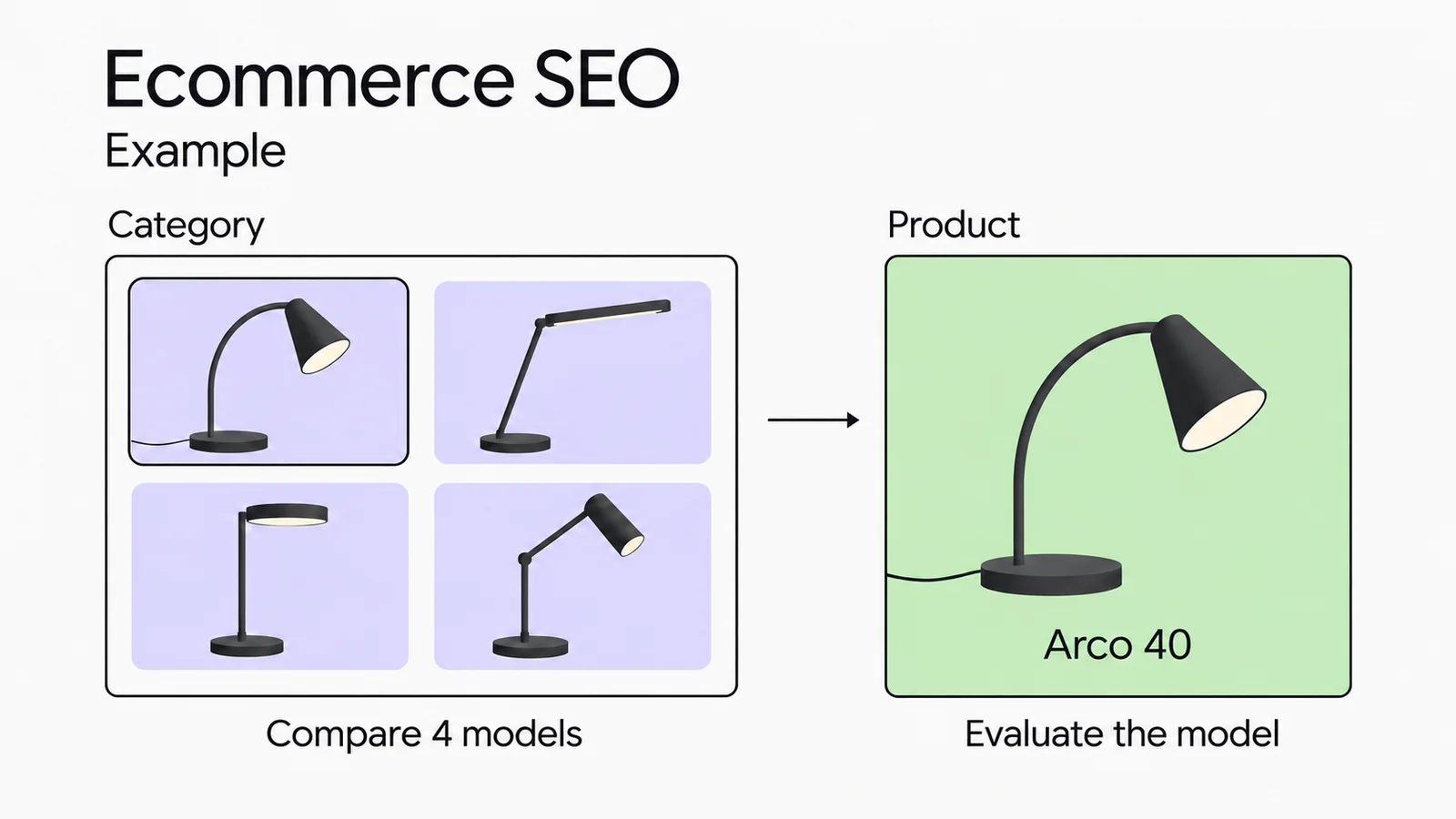
| Desk lamps | /desk-lamps/ | An indexable category where shoppers can compare the four models by size, adjustability, and price. |
| Dimmable desk lamps | /desk-lamps/dimmable/ | A potential category with three relevant models that the store restocks. Publish it only after confirming distinct demand and an assortment that will remain useful. |
| Arco 40 lamp | /products/arco-40/ | An indexable model page for shoppers looking for this product's specifications, price, and availability. |
| Selecting Arco 40 in black | /products/arco-40/?color=black | In this example, a variation of the same page. The URL selects the color; its canonical points to the base model page. |
| Sorting by price | /desk-lamps/?sort=price | A navigation option. It reorders the same products and doesn't need a separate search result. |
| Black, brass, under $50 | /desk-lamps/?color=black&material=brass&price=max50 | No dedicated SEO page: this selection changes too often in our catalog. Shoppers can still use the filter. |
The three dimmable models are a feature of this example, not a universal minimum for a category. If a new selection always shows the same products as its parent category and answers the same need, improve one destination. If it serves a distinct need, prepare a specific title, product selection, and buying advice before publishing it.
Decide how to handle variants, too. Our example keeps all colors on one product page. A store with separate variant pages needs each URL to show the selected variant's images, price, and availability. Google's documentation on product variant structured data covers both single-page and multi-page setups. Choose the approach that fits how your catalog works.
How do you turn filter decisions into technical rules?
Ask your developer to test a real URL for each intended behavior. "Exclude filters" doesn't say whether you want to remove indexed pages, reduce crawling, or consolidate duplicates.
A filtered selection should appear in Google
For /desk-lamps/dimmable/, request an accessible page without a noindex rule, with a self-referencing canonical and a link from its parent category. Make sure a broad filter rule doesn't block this page. Include it in the sitemap with the other URLs you've chosen to index.
Two URLs show identical or very similar content
A canonical indicates the preferred URL among duplicate or near-duplicate pages. A price-sorted URL can point to the base category. This doesn't prevent crawling, and Google may choose another URL. If the dimmable category serves its own purpose, don't consolidate it into the general category. Follow Google's canonical guidelines.
An indexed page needs to leave search results
Google must be able to read a page to see its noindex rule. Blocking the page in robots.txt at the same time would hide that instruction from the crawler. Check Search Console to confirm the exclusion has taken effect before considering further crawl restrictions. Google's noindex documentation explains this requirement.
Filter combinations generate too many unwanted URLs
If those URLs don't belong in search, discuss crawl rules for the relevant parameters with your developer. A robots.txt block limits access; it doesn't remove URLs that are already indexed. Before release, test the category, product pages, and the next page of results as well. They must remain accessible. See Google's guidance on faceted navigation.
For nonexistent filter combinations or combinations with no results, Google recommends returning HTTP 404 at the requested URL. Assess an established category that's temporarily empty separately: consider whether products will return and whether the information on the page is still useful. A rule for an impossible filter combination shouldn't determine what happens to every empty category.
These decisions apply across platforms, but implementation depends on your CMS, theme, and installed modules. Ask for staging tests of HTTP status codes, canonicals, robots rules, and generated links. If the CMS can't support a proposed rule, document that limitation and a testable alternative. Use the technical SEO audit guide to work through the checks.
What belongs on category and product pages?
Help shoppers narrow their choices on a category page. For desk lamps, make it easy to compare base size, height, adjustability, and dimming options. Show relevant products, prices, and availability. Filters should use consistently populated product attributes. A long introduction above the product grid can delay the comparison a visitor came to make.
A category introduction shoppers can use
Illustrative copy: "For a shallow desk, compare base diameters first. Arco 40's base is about 5.5 inches (14 cm) wide; Linea 60's is about 7.9 inches (20 cm), and it has a longer arm. Choose a dimmable model if you want to adjust brightness. Each product page lists the full dimensions and light source type."
On Arco 40's product page, give shoppers what they need to assess that model: dimensions with units, materials, bulb socket or integrated LED, compatibility, box contents, detail photos, and shipping and return terms. If the bulb isn't included, say so near the purchase information. Link to a compatible bulb only after verifying compatibility. Selecting the black variant must show its photo and stock status, even when a shopper arrives through a direct link.
The page title and H1 should make the page easy to identify. In our example, use "Dimmable desk lamps" for the category and "Arco 40 adjustable desk lamp" for the product. Add the brand and features when they help identify it. Avoid repeating generic "quality and design" copy across every product page or setting the same word count for every description.
Check your Product and Offer structured data as well. Price, currency, and availability must match the visible offer. If you use Merchant Center, compare those values with the feed. Run an available product, a variant, and an out-of-stock product through the Rich Results Test. The test checks markup. Eligibility doesn't guarantee a rich result or better rankings.
What should happen to out-of-stock or discontinued products?
Ask the purchasing manager whether the product will return, whether a replacement exists, and whether customers still need the old page. "Unavailable" isn't enough information to choose between keeping, redirecting, and removing it.
| Situation | Action | Check |
|---|---|---|
/products/luce-20/ will be restocked. | Keep the page with a 200 response, specifications, and a clear stock status. Give a restock date only if confirmed. You can offer a notification and relevant alternatives. | The page, markup, and feed show the correct status. The button doesn't promise an order you can't accept. |
/products/linea-50/ is discontinued; Linea 60 replaces it for the same use. | If the old page no longer serves a separate purpose, consider a permanent redirect to /products/linea-60/. Explain relevant differences on the new page for shoppers who wanted the old model. | The redirect goes straight to the new product page, which returns 200. Internal links and the sitemap use the destination URL. |
| Owners still need manuals and parts for the discontinued model. | Keep a useful support page and state that the product is no longer sold. Link to manuals, compatible parts, and alternatives without suggesting that the old model is available to buy. | The page answers owners' questions, and the feed no longer lists the product for sale. |
| No restock, replacement, or useful content to keep. | Remove the page with a 404 or 410 response, remove its URL from the sitemap, and update internal links. The error page can still offer search and relevant categories. | The HTTP response reflects the removal. Don't redirect every discontinued product to the homepage. |
Merchant Center distinguishes out_of_stock from backorder. The latter means you accept orders for a product that will ship when it's available again. Match the attribute to whether customers can actually buy the item, following the availability requirements. For the other decisions, your developer can check Google's guidance on permanent redirects and HTTP status codes.
How do shoppers and crawlers reach every useful page?
Shoppers should be able to open all four desk lamp product pages through standard links from the category. If published, the dimmable selection needs a link from the category and links to its relevant products. Google recommends navigation built with HTML links. A product page found only by typing its name into the store's search box may not be discovered through site links.
If a product list spans several pages, each next page needs its own URL and crawlable links. ?page=2 contains different products, so don't automatically give it a canonical pointing to page one. A "Load more" button needs an alternative path crawlers can follow, as explained in Google's pagination guidance.
A guide to choosing a lamp for a small desk could explain how to measure the space and link to suitable models. Write it when shoppers have questions that need more explanation. Keep each model's dimensions on its product page instead of repeating them across nearly identical articles. The Revée case study illustrates this division between informational articles, categories, and product pages, with links connecting different customer needs.
If you sell internationally, check search terms, product availability, and delivery terms for each market. The international SEO checklist covers these checks and language-specific URLs. If you're changing CMS platforms or URL structure, prepare your SEO migration map before changing catalog URLs.
How can sales data help you prioritize SEO work?
Address confirmed blockers first. A category with available products that's mistakenly excluded from the index takes priority over polishing an already useful description. Among accessible pages, compare observed demand, stock availability, margin, and the work required. A category with few orders may need attention if missing purchase information is losing shoppers. A popular discontinued product may primarily need a sensible plan for its removal or replacement.
Use Search Console for queries, clicks, and pages; Analytics for landing sessions and recorded actions; and your order management system for orders, returns, and margins. GA4 doesn't collect ecommerce events automatically. Have someone test the path from product page to purchase and refund. Product IDs, the transaction_id, value, and currency must arrive correctly, following the ecommerce measurement specifications.
A comparison using illustrative figures
Assume this fictional US store records 400 sessions from organic search that start on the desk lamp category in one month. Those sessions include 16 orders and $1,600 in revenue after returns, excluding sales tax. With an assumed contribution margin of 30%, $480 remains after the variable costs included in that margin, before SEO expenses and fixed costs: 1,600 × 0.30 = 480.
The floor lamp category receives 800 sessions of the same kind, but its eight orders generate $1,200 in net revenue. An assumed 20% contribution margin leaves $240. With stable inventory and a similar amount of content work required, we'd revise the desk lamp pages first. For floor lamps, we'd also check prices, shipping, and whether the products match the searches before pursuing more traffic.
This comparison counts orders placed during those sessions, with transaction IDs reconciled against the order management system. An order may contain products from other categories: the landing page and the items sold are separate dimensions. These figures don't establish how much revenue SEO caused, and they aren't a growth forecast. For the broader report, see how to measure SEO results.
How do you turn the review into an actionable plan?
Create a spreadsheet with one row per change. Copy these fields and assign each task to someone who can implement it. "Optimize categories" is too broad to tell whether the work is done.
URL or URL group
Observed problem and evidence
Decision and requested change
Owner and dependencies
Priority and reason
Target date / release date
Acceptance check
Outcome and next review
Fix a confirmed blocker
In our example,
/desk-lamps/has an accidentalnoindexrule. The developer removes it after confirming that the category is ready to be indexed. At handoff, check for a 200 response, the absence of that rule, and accessibility through URL Inspection. Return to the indexing report later: passing the live test doesn't prove Google has already updated its index.Assign content and data checks to the right people
The catalog manager confirms dimensions and availability for the four models. The writer updates the category and Arco 40 page. Set specific acceptance criteria: each agreed measurement appears on the product page, the selected color shows the correct photo and price, and the category supports comparison. Keep existing URLs unless there's a reason to change them.
Test the filter rule before releasing it
The developer demonstrates the result for a filter to exclude, the dimmable selection to publish, and a paginated page. The SEO lead compares those results with the original catalog map. If the rule also blocks a useful page, fix it before applying it across the catalog.
Separate release checks from performance review
After release, repeat the URL checks and test purchases, variants, and tracking. Schedule an initial data review after four complete weeks as a working checkpoint, not a deadline for rankings. Record promotions, stockouts, and other changes that might explain differences. If there's still too little data, observe for longer before deciding on more changes.
When you revisit the spreadsheet, close completed tasks with evidence and assign anything still open. If a category gets impressions for unexpected searches, check whether those searches fit the products before changing the selection or copy. If visits grow but orders stay flat, review availability and the purchase path with the person running the store.
Manufacturer descriptions and CMS URLs
Can I use the manufacturer's product descriptions?
Keep accurate specifications, compatibility details, and warnings. Add information you can verify as the retailer: what's in the box, close-up photos, delivery details, and answers to questions customers have asked. Swapping in synonyms doesn't help someone choose. Inventing hands-on experience or product features can lead to the wrong purchase.
Should I change URLs that contain CMS codes or unclear folder names?
An unclear URL alone doesn't justify a migration. First check whether the page is accessible, which URL is indexed, and whether duplicates exist. If you do change the structure, map the old URLs to the new ones, set up permanent redirects, and update internal links. For new pages, choose stable, readable URLs within your CMS's capabilities.